6 nov 2024

Feature of the week: Sorting columns in overview pages

You can now better keep track of customers, orders, invoices, and products with sorting columns in overview pages. With this feature, your navigation is streamlined, data is more accessible, and you can more quickly find the information you need.

Deidre Olsen

Senior Content Marketeer

A candid desk scene: an open ledger book, a printed invoice, a mug with a retro logo, and a laptop showing a customer record. Sunlight from the left casts sharp shadows across the desk, evoking late afternoon focus time. 90s analogue photo aesthetic, realistic textures. Minimal human presence, more “tools of the trade” feel. A strong diagonal beam of natural light cuts across the white wall in the background, adding depth and elegance to the composition. The entire setting is bright, airy, and minimal. The only accent of bold color: her strappy sandals are rendered in a deep, saturated Klein blue (#002fa7), with a matte, high-fashion finish that pops against the otherwise neutral tones. Photorealistic textures, soft diffused lighting, high-resolution editorial photography style, perfectly balanced and refined.

This week, we have a great update that's short, sweet, and super helpful. Now, you can better keep track of customers, orders, invoices, and products with sorting columns in overview pages.

With this feature, your navigation is streamlined, data is more accessible, and you can more quickly find the information you need.

What's new? 👀

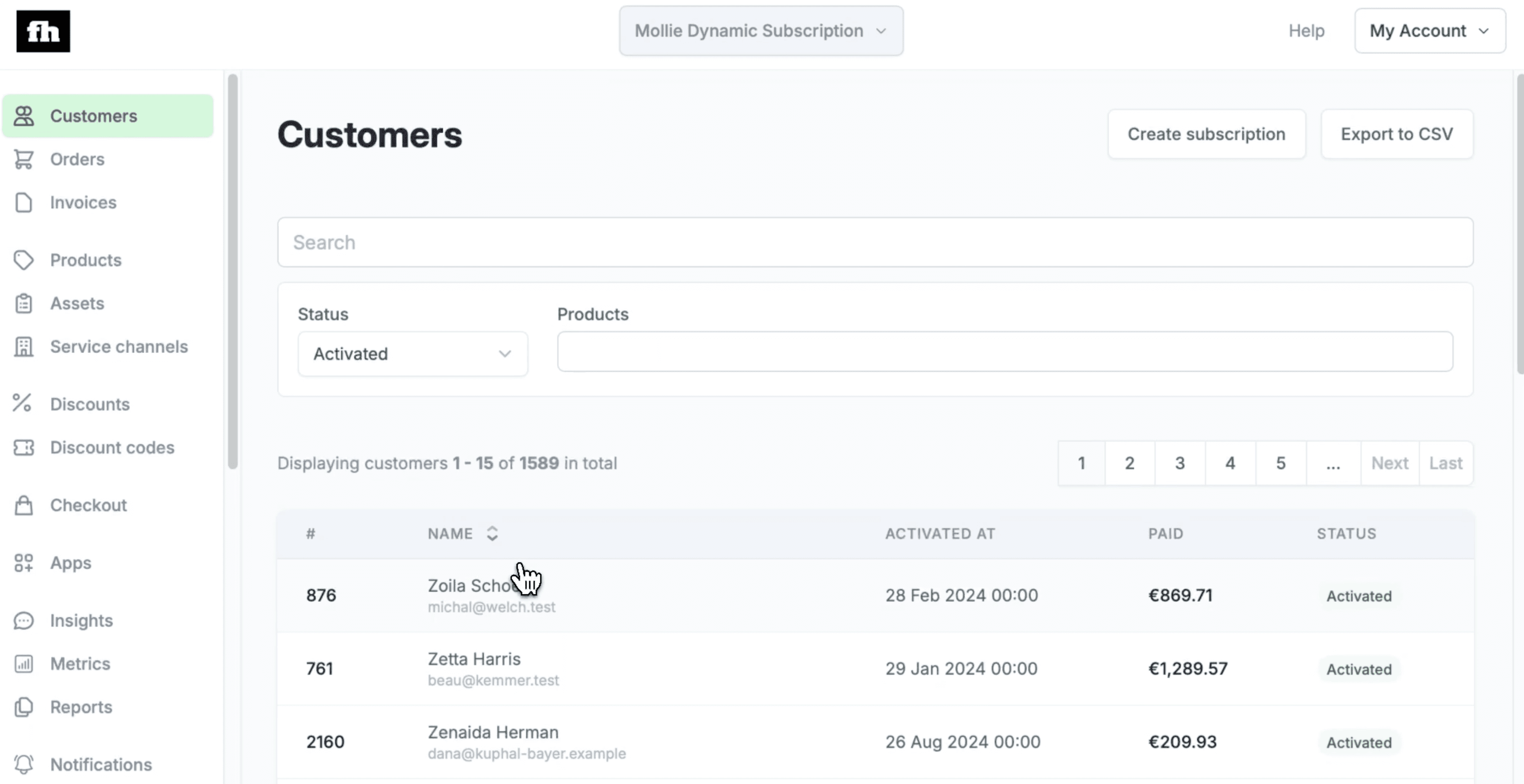
Our latest update allows you to easily organize data by your preferred column.

Whether you need to view your customers by name, orders by date, invoices by status, or products by price, this makes everything simple.

Sorting is now just a click away, and each overview starts with a default sort column for a seamless first look at your data.

What are the benefits? 🤔

Instead of scrolling through unsorted lists, you can arrange important data points to get a clearer view of your business.

That way, you can effortlessly track recent orders, non-paying customers, or overdue invoices, ensuring you can focus on what matters most at any given moment.

Now, you have more control over your operations and better insights to inform your decisions.

How it works ⚒️

When you open any of the overviews, the page will automatically display data sorted by a default column.

If you’d like to sort by a different column, simply hover over the header of the column you wish to sort. Once you see the sort arrow appear, click to reorder the data by that column.

Thanks for joining us for this week's updateIf you have any questions or feedback, give us a shout. And if you want to keep up with or check out more product features and updates, head on over to our Changelog.

Until next time!

Content

Scale your commerce business faster, with recurring revenue

From one-time to a lifetime, we help you to put customers at the heart of your business and build lasting relationships.