Shift Happens
Technology
Setting up SSL for your Rails app
In March 2015, I wrote about setting up SSL for your Rails app. Back then, only 16.4% of the 148.486 most popular website had secure SSL implemented.

Written by
Joshua Jansen
Published
In March 2015, I wrote about setting up SSL for your Rails app. Back then, only 16.4% of the 148.486 most popular website had secure SSL implemented. While this has improved quite a lot, it's still only 41.7% of the 141.160 most popular sites that are rolling secure SSL.
I think this has a lot to do with people either not really being aware the advantages of SSL or simply not knowing how to implement it.
In this article, I will go into the latter by writing a step by step guide for setting up SSL for your Rails app.
tl;dr steps for enabling SSL for you Rails app:
Generate a key and CSR with an SSL library (i.e. OpenSSL)
Upload CSR to SSL vendor and request certificate
Upload SSL certificate and key to server
Add SSL certificate to NGINX config and reload
Step 1: Generating the CSR (certificate signing request)
Before you can order a new certificate, you'll have to generate a certificate signing request. You can do this either on your local machine or your server.
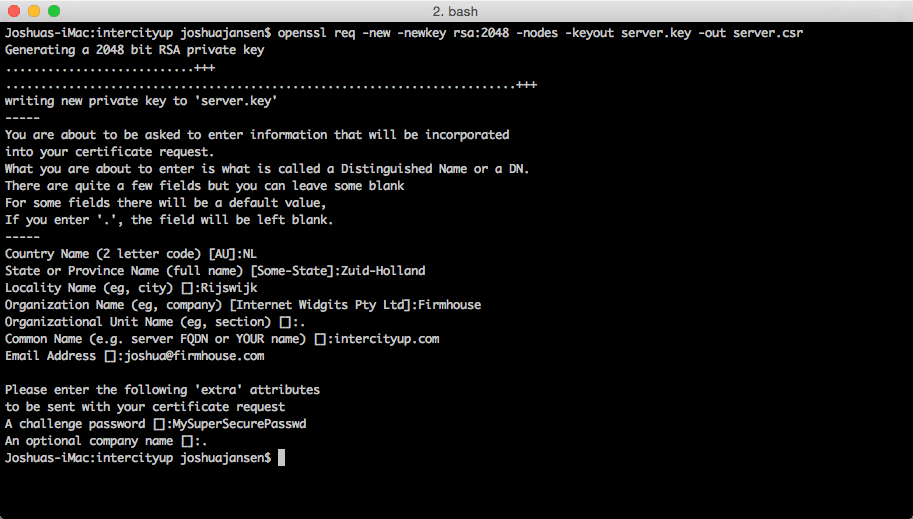
Given you have OpenSSL installed, you can fire up your terminal and execute:
You'll be prompted to supply information regarding the requesting organization.
It's important that you fill in the domain you are going to use as the "Common name". Most certificates also automatically include the www. prefix, so only enter the top level domain name here. Be sure to check this with your vendor.
Step 2: Request your certificate
Choose any SSL provider and create your account. At Firmhouse, we use te Dutch vendor sslcertificaten.nl.
Upload/paste your CSR and order your certificate. The vendor will ask you to go through a verification process to ensure that you are the administrator of the domain name. For the simple certificates, this is usually done with an email confirmation.
After confirming your identity, you'll be able to download the SSL certificates.
Step 3: Upload certificate and key to your server
Before you can upload your SSL key to your server, you'll have to combine it with the root certificates from your SSL vendor.
To do that, open your key and append the root certificate to the file. The order here is important; it should be:
Your certificate
Intermediate certificates
Root certificate
So in my case it would be:
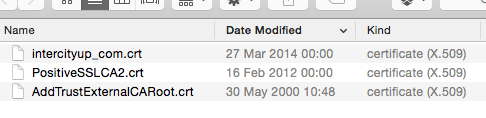
When merged, you can upload this file to your server, along with the key you've generated in step 1. Make sure to upload it to a directory that nginx can read.
Step 4: Configure NGINX
Update your nginx config for your Rails app with the proper paths.
Reload nginx with "service.nginx reload" and you're done!
Step 5: Extras
Bonus points if you enable force_ssl in your production.rb, Rails will then redirect all HTTP requests to their HTTPS equivalent.
Also, if you load any external resources in your application. For example assets via a CDN or embedded content in an iframe, make sure to use HTTPS for these as well.
If you have any questions or feedback, feel free to ping me on Twitter @joshuajansen or email me at mailto:joshua@firmhouse.com.
Keep reading

Technology
Why local payment methods matter for scaling recurring commerce across Europe
European customers who can pay with their preferred methods complete purchases more often and feel better about their shopping experience. This local touch helps customers feel at home during checkout—essential for subscription models that depend on long-term relationships.
Deidre Olsen
·

Technology
Seamless integration: Transforming customer experience with unified commerce
With a unified commerce strategy, merchants can transcend omnichannel limitations, resulting in personalized customer journeys, optimized order fulfillment, and flexible payment and delivery options.
Deidre Olsen
·

Technology
Embracing Digital Transformation With As-A-Service Models
Digitalization has changed not only technology but the way we do business nowadays. Learn how the trend for businesses has been moving in the direction of as-a-service models.
Cristina Quijano
·